🪄 Filter Function: Modify Inputs and Outputs
Welcome to the comprehensive guide on Filter Functions in Open WebUI! Filters are a flexible and powerful plugin system for modifying data before it's sent to the Large Language Model (LLM) (input) or after it’s returned from the LLM (output). Whether you’re transforming inputs for better context or cleaning up outputs for improved readability, Filter Functions let you do it all.
This guide will break down what Filters are, how they work, their structure, and everything you need to know to build powerful and user-friendly filters of your own. Let’s dig in, and don’t worry—I’ll use metaphors, examples, and tips to make everything crystal clear! 🌟
🌊 What Are Filters in Open WebUI?
Imagine Open WebUI as a stream of water flowing through pipes:
- User inputs and LLM outputs are the water.
- Filters are the water treatment stages that clean, modify, and adapt the water before it reaches the final destination.
Filters sit in the middle of the flow—like checkpoints—where you decide what needs to be adjusted.
Here’s a quick summary of what Filters do:
- Modify User Inputs (Inlet Function): Tweak the input data before it reaches the AI model. This is where you enhance clarity, add context, sanitize text, or reformat messages to match specific requirements.
- Intercept Model Outputs (Stream Function): Capture and adjust the AI’s responses as they’re generated by the model. This is useful for real-time modifications, like filtering out sensitive information or formatting the output for better readability.
- Modify Model Outputs (Outlet Function): Adjust the AI's response after it’s processed, before showing it to the user. This can help refine, log, or adapt the data for a cleaner user experience.
Key Concept: Filters are not standalone models but tools that enhance or transform the data traveling to and from models.
Filters are like translators or editors in the AI workflow: you can intercept and change the conversation without interrupting the flow.
🗺️ Structure of a Filter Function: The Skeleton
Let's start with the simplest representation of a Filter Function. Don't worry if some parts feel technical at first—we’ll break it all down step by step!
🦴 Basic Skeleton of a Filter
from pydantic import BaseModel
from typing import Optional

class Filter:
    # Valves: Configuration options for the filter
    class Valves(BaseModel):
        pass

    def __init__(self):
        # Initialize valves (optional configuration for the Filter)
        self.valves = self.Valves()

    def inlet(self, body: dict) -> dict:
        # This is where you manipulate user inputs.
        print(f"inlet called: {body}")
        return body

    def stream(self, event: dict) -> dict:
        # This is where you modify streamed chunks of model output.
        print(f"stream event: {event}")
        return event

    def outlet(self, body: dict) -> None:
        # This is where you manipulate model outputs.
        print(f"outlet called: {body}")
🆕 🧲 Toggle Filter Example: Adding Interactivity and Icons (New in Open WebUI 0.6.10)
Filters can do more than simply modify text—they can expose UI toggles and display custom icons. For instance, you might want a filter that can be turned on/off with a user interface button, and displays a special icon in Open WebUI’s message input UI.
Here’s how you could create such a toggle filter:
from pydantic import BaseModel, Field
from typing import Optional

class Filter:
    class Valves(BaseModel):
        pass

    def __init__(self):
        self.valves = self.Valves()
        self.toggle = True # IMPORTANT: This creates a switch UI in Open WebUI
        # TIP: Use SVG Data URI!
        self.icon = """data:image/svg+xml;base64,PHN2ZyB4bWxucz0iaHR0cDovL3d3dy53My5vcmcvMjAwMC9zdmciIGZpbGw9Im5vbmUiIHZpZXdCb3g9IjAgMCAyNCAyNCIgc3Ryb2tlLXdpZHRoPSIxLjUiIHN0cm9rZT0iY3VycmVudENvbG9yIiBjbGFzcz0ic2l6ZS02Ij4KICA8cGF0aCBzdHJva2UtbGluZWNhcD0icm91bmQiIHN0cm9rZS1saW5lam9pbj0icm91bmQiIGQ9Ik0xMiAxOHYtNS4yNW0wIDBhNi4wMSA2LjAxIDAgMCAwIDEuNS0uMTg5bS0xLjUuMTg5YTYuMDEgNi4wMSAwIDAgMS0xLjUtLjE4OW0zLjc1IDcuNDc4YTEyLjA2IDEyLjA2IDAgMCAxLTQuNSAwbTMuNzUgMi4zODNhMTQuNDA2IDE0LjQwNiAwIDAgMS0zIDBNMTQuMjUgMTh2LS4xOTJjMC0uOTgzLjY1OC0xLjgyMyAxLjUwOC0yLjMxNmE3LjUgNy41IDAgMSAwLTcuNTE3IDBjLjg1LjQ5MyAxLjUwOSAxLjMzMyAxLjUwOSAyLjMxNlYxOCIgLz4KPC9zdmc+Cg=="""
        pass

    async def inlet(
        self, body: dict, __event_emitter__, __user__: Optional[dict] = None
    ) -> dict:
        await __event_emitter__(
            {
                "type": "status",
                "data": {
                    "description": "Toggled!",
                    "done": True,
                    "hidden": False,
                },
            }
        )
        return body
🖼️ What’s happening?
- toggle = True creates a switch UI in Open WebUI—users can manually enable or disable the filter in real time.
- icon (with a Data URI) will show up as a little image next to the filter’s name. You can use any SVG as long as it’s Data URI encoded!
- The
inletfunction uses the__event_emitter__special argument to broadcast feedback/status to the UI, such as a little toast/notification that reads "Toggled!"
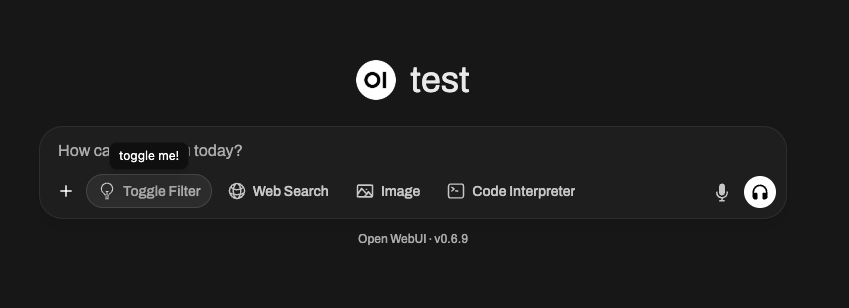
You can use these mechanisms to make your filters dynamic, interactive, and visually unique within Open WebUI’s plugin ecosystem.
🎯 Key Components Explained
1️⃣ Valves Class (Optional Settings)
Think of Valves as the knobs and sliders for your filter. If you want to give users configurable options to adjust your Filter’s behavior, you define those here.
class Valves(BaseModel):
    OPTION_NAME: str = "Default Value"
For example:
If you're creating a filter that converts responses into uppercase, you might allow users to configure whether every output gets totally capitalized via a valve like TRANSFORM_UPPERCASE: bool = True/False.
Configuring Valves with Dropdown Menus (Enums)
You can enhance the user experience for your filter's settings by providing dropdown menus instead of free-form text inputs for certain Valves. This is achieved using json_schema_extra with the enum keyword in your Pydantic Field definitions.
The enum keyword allows you to specify a list of predefined values that the UI should present as options in a dropdown.
Example: Creating a dropdown for color themes in a filter.
from pydantic import BaseModel, Field
from typing import Optional

# Define your available options (e.g., color themes)
COLOR_THEMES = {
    "Plain (No Color)": [],
    "Monochromatic Blue": ["blue", "RoyalBlue", "SteelBlue", "LightSteelBlue"],
    "Warm & Energetic": ["orange", "red", "magenta", "DarkOrange"],
    "Cool & Calm": ["cyan", "blue", "green", "Teal", "CadetBlue"],
    "Forest & Earth": ["green", "DarkGreen", "LimeGreen", "OliveGreen"],
    "Mystical Purple": ["purple", "DarkOrchid", "MediumPurple", "Lavender"],
    "Grayscale": ["gray", "DarkGray", "LightGray"],
    "Rainbow Fun": [
        "red",
        "orange",
        "yellow",
        "green",
        "blue",
        "indigo",
        "violet",
    ],
    "Ocean Breeze": ["blue", "cyan", "LightCyan", "DarkTurquoise"],
    "Sunset Glow": ["DarkRed", "DarkOrange", "Orange", "gold"],
    "Custom Sequence (See Code)": [],
}

class Filter:
    class Valves(BaseModel):
        selected_theme: str = Field(
            "Monochromatic Blue",
            description="Choose a predefined color theme for LLM responses. 'Plain (No Color)' disables coloring.",
            json_schema_extra={"enum": list(COLOR_THEMES.keys())}, # KEY: This creates the dropdown
        )
        custom_colors_csv: str = Field(
            "",
            description="CSV of colors for 'Custom Sequence' theme (e.g., 'red,blue,green'). Uses xcolor names.",
        )
        strip_existing_latex: bool = Field(
            True,
            description="If true, attempts to remove existing LaTeX color commands. Recommended to avoid nested rendering issues.",
        )
        colorize_type: str = Field(
            "sequential_word",
            description="How to apply colors: 'sequential_word' (word by word), 'sequential_line' (line by line), 'per_letter' (letter by letter), 'full_message' (entire message).",
            json_schema_extra={
                "enum": [
                    "sequential_word",
                    "sequential_line",
                    "per_letter",
                    "full_message",
                ]
            }, # Another example of an enum dropdown
        )
        color_cycle_reset_per_message: bool = Field(
            True,
            description="If true, the color sequence restarts for each new LLM response message. If false, it continues across messages.",
        )
        debug_logging: bool = Field(
            False,
            description="Enable verbose logging to the console for debugging filter operations.",
        )

    def __init__(self):
        self.valves = self.Valves()
        # ... rest of your __init__ logic ...
What's happening?
json_schema_extra: This argument inFieldallows you to inject arbitrary JSON Schema properties that Pydantic doesn't explicitly support but can be used by downstream tools (like Open WebUI's UI renderer)."enum": list(COLOR_THEMES.keys()): This tells Open WebUI that theselected_themefield should present a selection of values, specifically the keys from ourCOLOR_THEMESdictionary. The UI will then render a dropdown menu with "Plain (No Color)", "Monochromatic Blue", "Warm & Energetic", etc., as selectable options.- The
colorize_typefield also demonstrates anotherenumdropdown for different coloring methods.
Using enum for your Valves options makes your filters more user-friendly and prevents invalid inputs, leading to a smoother configuration experience.
2️⃣ inlet Function (Input Pre-Processing)
The inlet function is like prepping food before cooking. Imagine you’re a chef: before the ingredients go into the recipe (the LLM in this case), you might wash vegetables, chop onions, or season the meat. Without this step, your final dish could lack flavor, have unwashed produce, or simply be inconsistent.
In the world of Open WebUI, the inlet function does this important prep work on the user input before it’s sent to the model. It ensures the input is as clean, contextual, and helpful as possible for the AI to handle.
📥 Input:
body: The raw input from Open WebUI to the model. It is in the format of a chat-completion request (usually a dictionary that includes fields like the conversation's messages, model settings, and other metadata). Think of this as your recipe ingredients.
🚀 Your Task:
Modify and return the body. The modified version of the body is what the LLM works with, so this is your chance to bring clarity, structure, and context to the input.
🍳 Why Would You Use the inlet?
-
Adding Context: Automatically append crucial information to the user’s input, especially if their text is vague or incomplete. For example, you might add "You are a friendly assistant" or "Help this user troubleshoot a software bug."
-
Formatting Data: If the input requires a specific format, like JSON or Markdown, you can transform it before sending it to the model.
-
Sanitizing Input: Remove unwanted characters, strip potentially harmful or confusing symbols (like excessive whitespace or emojis), or replace sensitive information.
-
Streamlining User Input: If your model’s output improves with additional guidance, you can use the
inletto inject clarifying instructions automatically!
💡 Example Use Cases: Build on Food Prep
🥗 Example 1: Adding System Context
Let’s say the LLM is a chef preparing a dish for Italian cuisine, but the user hasn’t mentioned "This is for Italian cooking." You can ensure the message is clear by appending this context before sending the data to the model.
def inlet(self, body: dict, __user__: Optional[dict] = None) -> dict:
    # Add system message for Italian context in the conversation
    context_message = {
        "role": "system",
        "content": "You are helping the user prepare an Italian meal."
    }
    # Insert the context at the beginning of the chat history
    body.setdefault("messages", []).insert(0, context_message)
    return body
📖 What Happens?
- Any user input like "What are some good dinner ideas?" now carries the Italian theme because we’ve set the system context! Cheesecake might not show up as an answer, but pasta sure will.
🔪 Example 2: Cleaning Input (Remove Odd Characters)
Suppose the input from the user looks messy or includes unwanted symbols like !!!, making the conversation inefficient or harder for the model to parse. You can clean it up while preserving the core content.
def inlet(self, body: dict, __user__: Optional[dict] = None) -> dict:
    # Clean the last user input (from the end of the 'messages' list)
    last_message = body["messages"][-1]["content"]
    body["messages"][-1]["content"] = last_message.replace("!!!", "").strip()
    return body
📖 What Happens?
- Before:
"How can I debug this issue!!!"➡️ Sent to the model as"How can I debug this issue"
Note: The user feels the same, but the model processes a cleaner and easier-to-understand query.
📊 How inlet Helps Optimize Input for the LLM:
- Improves accuracy by clarifying ambiguous queries.
- Makes the AI more efficient by removing unnecessary noise like emojis, HTML tags, or extra punctuation.
- Ensures consistency by formatting user input to match the model’s expected patterns or schemas (like, say, JSON for a specific use case).
💭 Think of inlet as the sous-chef in your kitchen—ensuring everything that goes into the model (your AI "recipe") has been prepped, cleaned, and seasoned to perfection. The better the input, the better the output!
🆕 3️⃣ stream Hook (New in Open WebUI 0.5.17)
🔄 What is the stream Hook?
The stream function is a new feature introduced in Open WebUI 0.5.17 that allows you to intercept and modify streamed model responses in real time.
Unlike outlet, which processes an entire completed response, stream operates on individual chunks as they are received from the model.
🛠️ When to Use the Stream Hook?
- Modify streaming responses before they are displayed to users.
- Implement real-time censorship or cleanup.
- Monitor streamed data for logging/debugging.
📜 Example: Logging Streaming Chunks
Here’s how you can inspect and modify streamed LLM responses:
def stream(self, event: dict) -> dict:
    print(event)  # Print each incoming chunk for inspection
    return event
Example Streamed Events:
{"id": "chatcmpl-B4l99MMaP3QLGU5uV7BaBM0eDS0jb","choices": [{"delta": {"content": "Hi"}}]}
{"id": "chatcmpl-B4l99MMaP3QLGU5uV7BaBM0eDS0jb","choices": [{"delta": {"content": "!"}}]}
{"id": "chatcmpl-B4l99MMaP3QLGU5uV7BaBM0eDS0jb","choices": [{"delta": {"content": " 😊"}}]}
📖 What Happens?
- Each line represents a small fragment of the model's streamed response.
- The
delta.contentfield contains the progressively generated text.
🔄 Example: Filtering Out Emojis from Streamed Data
def stream(self, event: dict) -> dict:
    for choice in event.get("choices", []):
        delta = choice.get("delta", {})
        if "content" in delta:
            delta["content"] = delta["content"].replace("😊", "")  # Strip emojis
    return event
📖 Before: "Hi 😊"
📖 After: "Hi"
4️⃣ outlet Function (Output Post-Processing)
The outlet function is like a proofreader: tidy up the AI's response (or make final changes) after it’s processed by the LLM.
📤 Input:
body: This contains all current messages in the chat (user history + LLM replies).
🚀 Your Task: Modify this body. You can clean, append, or log changes, but be mindful of how each adjustment impacts the user experience.
💡 Best Practices:
- Prefer logging over direct edits in the outlet (e.g., for debugging or analytics).
- If heavy modifications are needed (like formatting outputs), consider using the pipe function instead.
💡 Example Use Case: Strip out sensitive API responses you don't want the user to see:
def outlet(self, body: dict, __user__: Optional[dict] = None) -> dict:
    for message in body["messages"]:
        message["content"] = message["content"].replace("<API_KEY>", "[REDACTED]")
    return body
🌟 Filters in Action: Building Practical Examples
Let’s build some real-world examples to see how you’d use Filters!
📚 Example #1: Add Context to Every User Input
Want the LLM to always know it's assisting a customer in troubleshooting software bugs? You can add instructions like "You're a software troubleshooting assistant" to every user query.
class Filter:
    def inlet(self, body: dict, __user__: Optional[dict] = None) -> dict:
        context_message = {
            "role": "system",
            "content": "You're a software troubleshooting assistant."
        }
        body.setdefault("messages", []).insert(0, context_message)
        return body
📚 Example #2: Highlight Outputs for Easy Reading
Returning output in Markdown or another formatted style? Use the outlet function!
class Filter:
    def outlet(self, body: dict, __user__: Optional[dict] = None) -> dict:
        # Add "highlight" markdown for every response
        for message in body["messages"]:
            if message["role"] == "assistant":  # Target model response
                message["content"] = f"**{message['content']}**"  # Highlight with Markdown
        return body
🚧 Potential Confusion: Clear FAQ 🛑
Q: How Are Filters Different From Pipe Functions?
Filters modify data going to and coming from models but do not significantly interact with logic outside of these phases. Pipes, on the other hand:
- Can integrate external APIs or significantly transform how the backend handles operations.
- Expose custom logic as entirely new "models."
Q: Can I Do Heavy Post-Processing Inside outlet?
You can, but it’s not the best practice.:
- Filters are designed to make lightweight changes or apply logging.
- If heavy modifications are required, consider a Pipe Function instead.
🎉 Recap: Why Build Filter Functions?
By now, you’ve learned:
- Inlet manipulates user inputs (pre-processing).
- Stream intercepts and modifies streamed model outputs (real-time).
- Outlet tweaks AI outputs (post-processing).
- Filters are best for lightweight, real-time alterations to the data flow.
- With Valves, you empower users to configure Filters dynamically for tailored behavior.
🚀 Your Turn: Start experimenting! What small tweak or context addition could elevate your Open WebUI experience? Filters are fun to build, flexible to use, and can take your models to the next level!
Happy coding! ✨